SSTP
Secure Socket Tunneling Protocol (SSTP) encapsulates Point-to-Point Protocol (PPP) traffic within a Transport Layer Security (TLS) session to provide secure remote access over the internet. SSTP uses HTTPS over TCP port 443, allowing VPN traffic to pass through most firewalls, network address translation (NAT) devices, and proxy servers that typically permit standard web traffic.
SSTP supports strong encryption, authentication, and data integrity through TLS, helping protect transmitted data from interception or tampering. Because it relies on TCP, SSTP can provide reliable connections in unstable network conditions, although it may introduce additional overhead compared to VPN protocols based on UDP.
SSTP is commonly used in environments where other VPN protocols, such as PPTP, L2TP/IPsec, or OpenVPN on non-standard ports, may be blocked by network restrictions.
Introduction
Let's take a look at the SSTP connection mechanism:
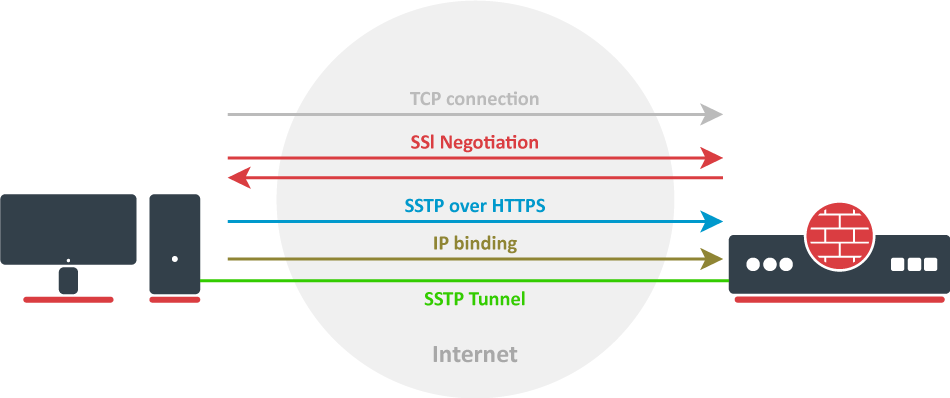
- A TCP connection is established from client to server (by default on port 443).
- SSL validates the server certificate. If a certificate is valid, a connection is established; otherwise, the connection is turned down. (But see note below).
- The client sends SSTP control packets within the HTTPS session which establishes the SSTP state machine on both sides.
- PPP negotiation over SSTP. The client authenticates to the server and binds IP addresses to the SSTP interface.
SSTP tunnel is now established and packet encapsulation can begin.
Starting from v5.0beta2, SSTP does not require certificates to operate and can use any available authentication type. This feature will work only between two MikroTik routers, as it is not in accordance with Microsoft standards. Otherwise, to establish secure tunnels, mschap authentication and client/server certificates from the same chain should be used.
Warning: TLS SNI support has been added starting with the 7.15beta10 version, the extension will be added to client hello packets if the "Add SNI" checkbox is checked or set in CLI:
/interface/sstp-client/set add-sni=yes
SSTP Client
Properties
| authentication (chap, mschap1, mschap2, pap; Default: "all") | Allowed authentication methods, by default all methods are allowed. |
| disabled (yes | no; Default: yes) | Enables/disables tunnel. |
| add-default-route (yes | no; Default: no) | Whether to add L2TP remote address as a default route. |
| default-route-distance (byte; Default: ) | Sets distance value applied to auto-created default route, if add-default-route is also selected. |
| mrru (integer: 512..65535|disabled; Default: disabled) | Maximum packet size that can be received on the link. If a packet is bigger than tunnel MTU, it will be split into multiple packets, allowing full-size IP or Ethernet packets to be sent over the tunnel. |
| proxy-port (string; Default: 443 ) | Sets proxy port. |
| add-sni (yes | no; Default: no) | Enables/disables service. |
| dial-on-demand (yes | no; Default: no) | Connects only when outbound traffic is generated. If selected, then a route with gateway address from 10.112.112.0/24 network will be added while connection is not established. |
| name (string; Default: ) | Descriptive name of the interface. |
| tls-version(any|only-1.2; Default: any) | Specifies which TLS version to allow. |
| numbers (integer;) | Sets number for a tunnel in ROS. |
| user (string; Default: ) | User name used for authentication. |
| certificate (string|none; Default: none) | Name of the client certificate |
| http-proxy (string; Default: ) | Proxy address field. |
| password (string; Default: "") sensitive | Password used for authentication. |
| verify-server-address-from-certificate (yes|no; Default: no) | SSTP client will verify server address in certificate. |
| verify-server-certificate (yes|no; Default: no) | SSTP client will verify server certificate. |
| ciphers (aes256-gcm-sha384 | aes256-sha; Default: all) | Allowed ciphers. |
| keepalive-timeout (integer; Default:60) | Sets keepalive timeout in seconds. |
| pfs (yes | no | required ; Default: no) | Specifies which TLS authentication to use. With pfs=yes, TLS will use ECDHE-RSA- and DHE-RSA-. For maximum security, setting pfs=required will use only ECDHE. |
| comment (string; Default: ) | Short description of the tunnel. |
| max-mru (integer; Default: 1460) | Maximum Receive Unit. |
| max-mtu (integer; Default: 1460) | Maximum Transmission Unit. |
| port (integer; Default: 443) | Port to connect to. |
| connect-to (IP|IPv6; Default: ) | Remote address of the SSTP server. |
| profile (name; Default: default) | Specifies which PPP profile configuration will be used when establishing the tunnel. |
SSTP Server
Properties
| authentication (chap, mschap1, mschap2, pap; Default: "all") | Allowed authentication methods, by default all methods are allowed. |
| keepalive-timeout (integer; Default:60) | Sets the keepalive timeout in seconds. |
| port (string; Default: 443 ) | Sets the port used. |
| certificate (string|none; Default: none) | Name of the certificate in use. |
| max-mru (integer; Default: 1460) | Maximum Receive Unit. |
| max-mtu (integer; Default: 1460) | Maximum Transmission Unit. |
| tls-version(any|only-1.2; Default: any) | Specifies which TLS version to allow. |
| ciphers (aes256-gcm-sha384 | aes256-sha; Default: all) | Allowed ciphers. |
| verify-client-certificate (yes|no; Default: no) | SSTP server will verify the client certificate. |
| mrru (integer: 512..65535|disabled; Default: disabled) | maximum packet size that can be received on the link. If a packet is bigger than tunnel MTU, it will be split into multiple packets, allowing full size IP or Ethernet packets to be sent over the tunnel. |
| default-profile (name; Default: default) | Specifies which PPP profile configuration will be used when establishing the tunnel. |
| enabled (yes | no; Default: no) | Enables/disables the service. |
| pfs (yes | no | required ; Default: no) | Specifies which TLS authentication to use. With pfs=yes, TLS will use ECDHE-RSA- and DHE-RSA-. For maximum security, setting pfs=required will use only ECDHE. |
Certificates
To set up a secure SSTP tunnel, certificates are required. On the server, authentication is done only by username and password, but on the client - the server is authenticated using a server certificate. It is also used by the client to cryptographically bind SSL and PPP authentication, meaning - the client sends a special value over the SSTP connection to the server, this value is derived from the key data that is generated during PPP authentication and the server certificate. This allows the server to check if both channels are secure.
If SSTP clients are on Windows PCs then the only way to set up a secure SSTP tunnel when using a self-signed certificate is by importing the "server" certificate on the SSTP server and adding a CA certificate on the Windows PC in the trusted root.
If your server certificate is issued by a CA which is already known to Windows, then the Windows client will work without any additional certificate imports into a trusted root.
Caution: RSA key length must be at least 472 bits if a certificate is used by SSTP. Shorter keys are considered as security threats.
A similar configuration on a RouterOS client would be to import the CA certificate and enabling the verify-server-certificate option. In this scenario, Man-in-the-Middle attacks are not possible.
Between two Mikrotik routers, it is also possible to set up an insecure tunnel by not using certificates at all. In this case, data going through the SSTP tunnel is using anonymous DH and Man-in-the-Middle attacks are easily accomplished. This scenario is not compatible with Windows clients.
It is also possible to make a secure SSTP tunnel by adding additional authorization with a client certificate. Configuration requirements are:
- Certificates on both server and client.
- Verification options enabled on server and client.
This scenario is also not possible with Windows clients, because there is no way to set up a client certificate on Windows.
Certificate Error Messages
When the SSL handshake fails, you will see one of the following certificate errors:
- Certificate is not yet valid - notBefore certificate date is after the current time.
- Certificate has expired - certificate expiry date is before the current time.
- Invalid certificate purpose - the supplied certificate cannot be used for the specified purpose.
- Self signed certificate in a chain - the certificate chain could be built up using the untrusted certificates but the root could not be found locally.
- Unable to get issuer certificate locally - CA certificate is not imported locally.
- Server's IP address does not match certificate - server address verification is enabled, but the address provided in certificate does not match the server's address.
Quick Example
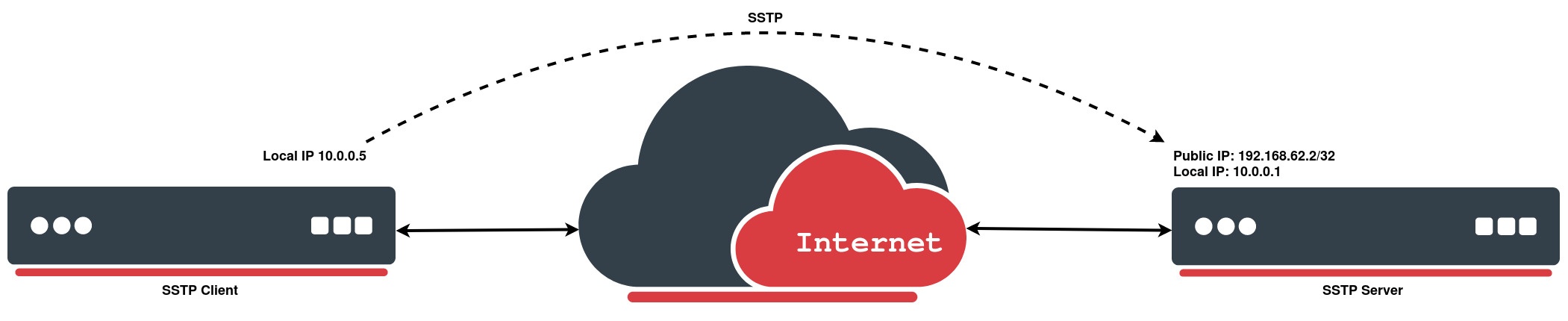
SSTP Client
In the following configuration example, we will create a simple SSTP client without using a certificate:
[admin@MikroTik > /interface/sstp-client/add connect-to=192.168.62.2 disabled=no name=sstp-out1 password=StrongPass profile=default-encryption user=MT-User
[admin@MikroTik > /interface/sstp-client/print
Flags: X - disabled; R - running
 0  R name="sstp-out1" max-mtu=1500 max-mru=1500 mrru=disabled connect-to=192.168.62.2:443
      http-proxy=0.0.0.0:443 certificate=none verify-server-certificate=no
      verify-server-address-from-certificate=yes user="MT-User" password="StrongPass"
      profile=default-encryption keepalive-timeout=60 add-default-route=no dial-on-demand=no
      authentication=pap,chap,mschap1,mschap2 pfs=no tls-version=any
SSTP Server
We will configure PPP secret for a particular user, and afterwards simply enable an SSTP server:
[admin@MikroTik] > /ppp/secret/add local-address=10.0.0.1 name=MT-User password=StrongPass remote-address=10.0.0.5 service=sstp
[admin@MikroTik] > /interface/sstp-server/server/set default-profile=default-encryption enabled=yes
[admin@MikroTik] > /interface/sstp-server/server/print
enabled: yes
: 443
max-mtu: 1500
max-mru: 1500
mrru: disabled
keepalive-timeout: 60
default-: default-encryption
authentication: pap,chap,mschap1,mschap2
: none
verify-client-: no
pfs: no
tls-version: any
In P2P setups the network address will be the same as the other endpoint's local address.
Important: As with any other ppp tunnel, SSTP also supports BCP which allows it to bridge SSTP tunnel with a local interface. For example in setups where routers are connected to the Internet through ether1, workstations and laptops are connected to ether2. Both local networks are routed through SSTP client, and they are not in the same broadcast domain. BCP is used.